

TaskLive SnapBill · Expense bills, on your phone
Your bills never leave your phone.
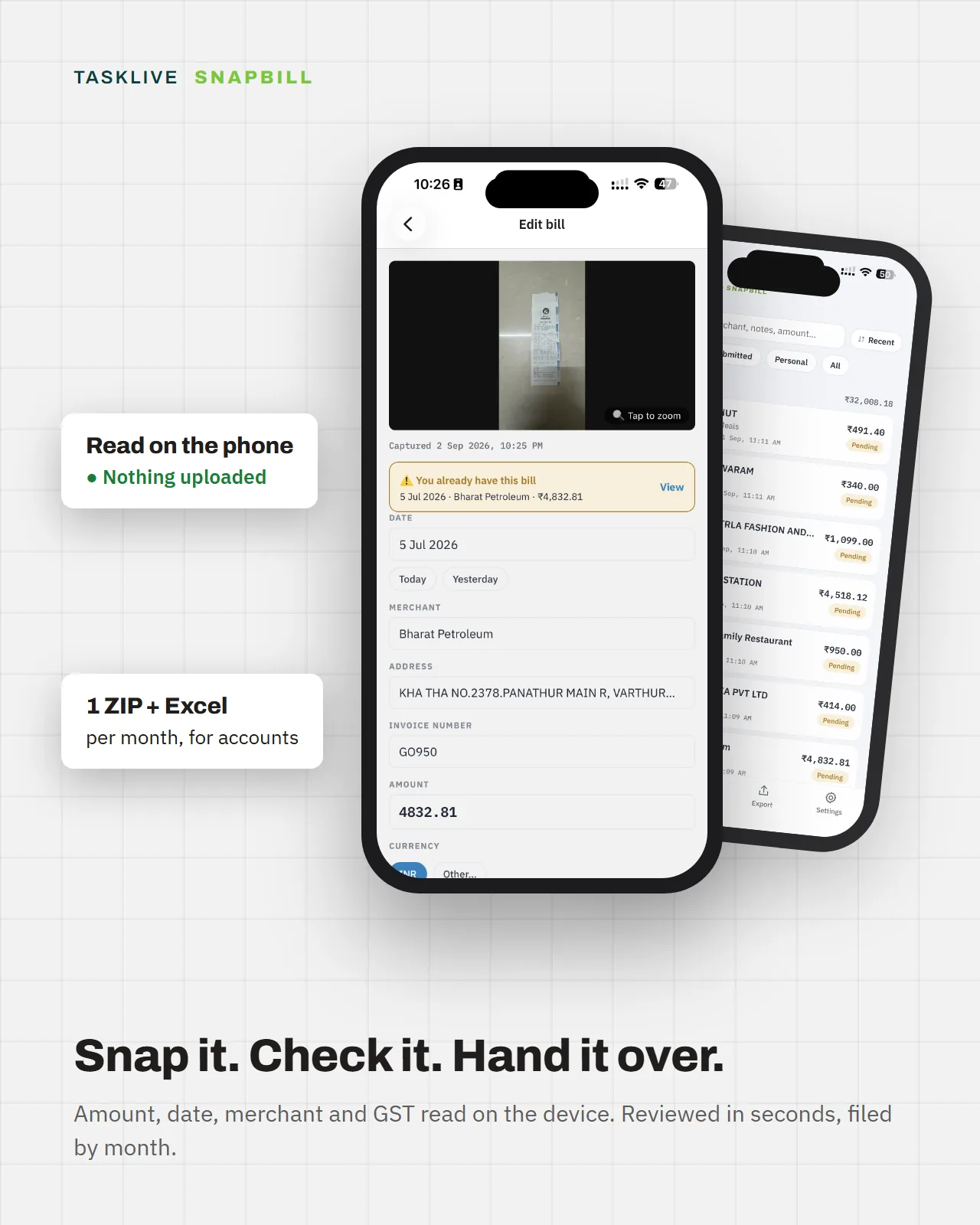
Photograph a bill at the card machine. SnapBill reads the amount, date, merchant and tax details on the phone itself, files it into its month, and hands accounts one ZIP with every image and an Excel summary. No account. No server. Nothing uploaded.
- Android and iPhone
- Coming to Google Play and the App Store
- Works in airplane mode
- No sign-in, no cloud
- One ZIP + Excel a month
- Optional PIN lock
The problem
The bill is captured at the point of spend. Then it is forgotten.
Company-card bills pile up in wallets, glove boxes and WhatsApp threads. Accounts asks for them at month-end or year-end, and the scramble begins.
At the counter
The card is tapped, the bill goes into a pocket, and the moment is over.
Weeks later
It is somewhere: a wallet, a glove box, a photo in a WhatsApp thread.
Month-end
Accounts asks. Which restaurant, what date, how much, where is the photo.
With SnapBill
Filed in the five seconds you are already standing there.
Photographed at the point of spend, read on the phone, and waiting in its month when accounts asks.
Four steps
Snap, check, file, hand over.
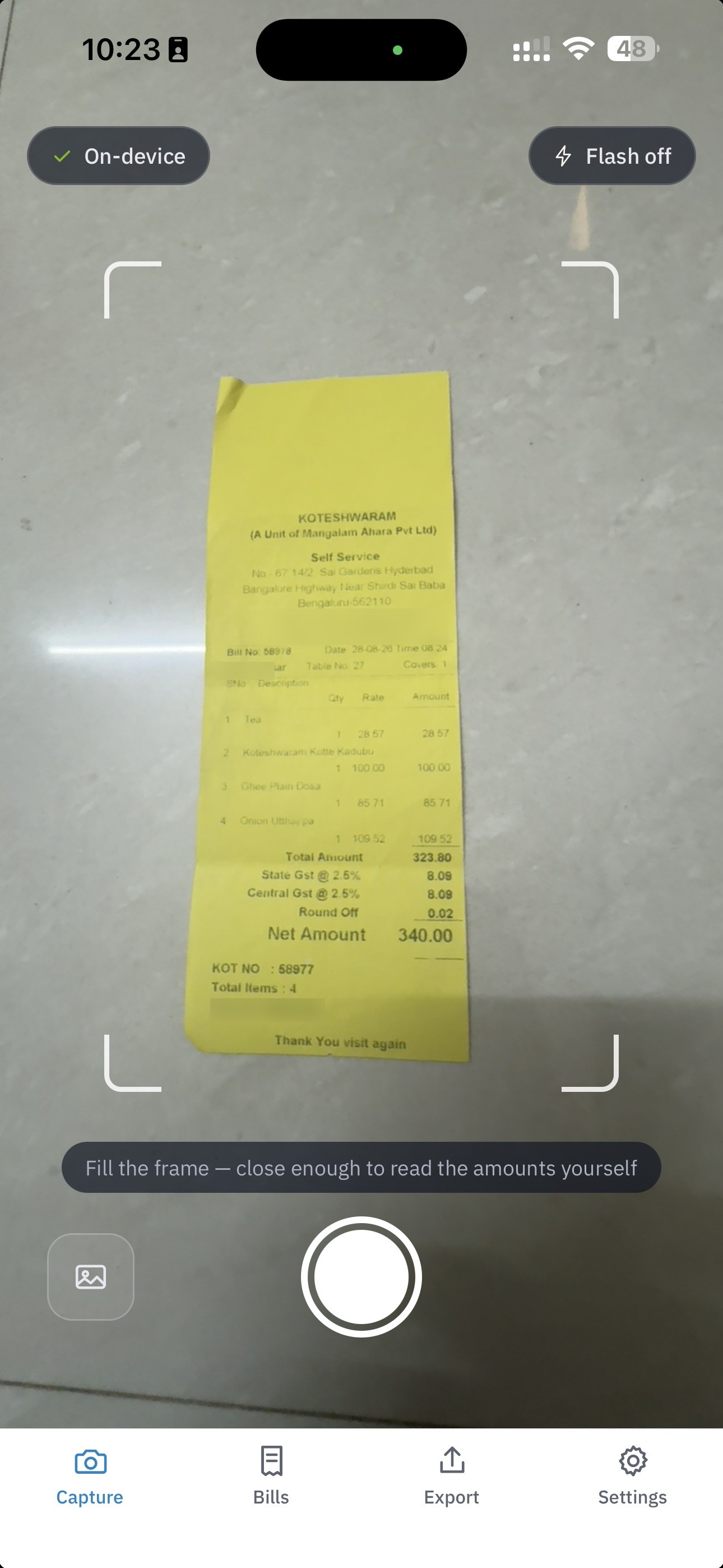
Snap
The app opens on the camera with a guide frame. Five checks run instantly: blur, glare, cut-off edges, unreadable print, missing digits. Each offers Retake or Use anyway. They never block.
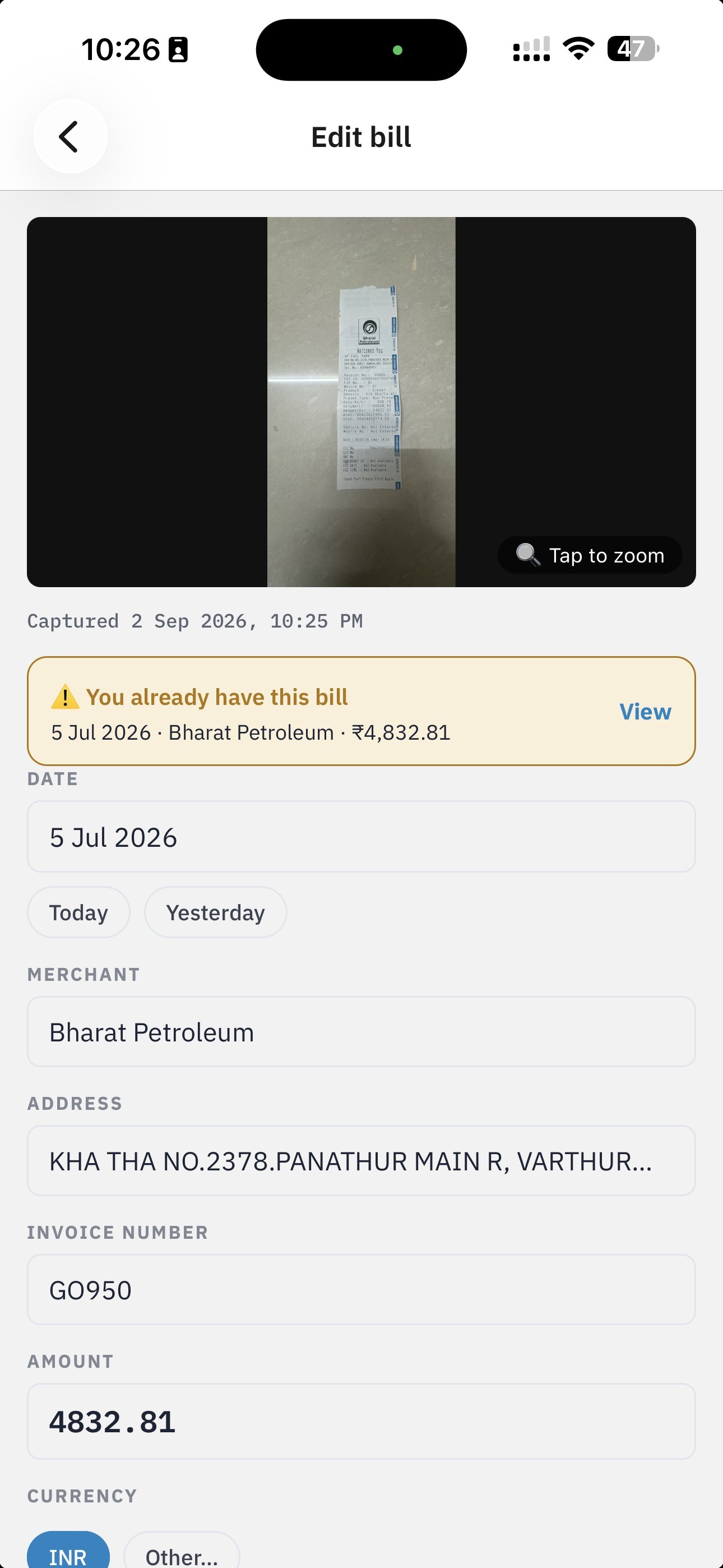
Check
Amount, date, merchant, invoice number and the GST or VAT breakup come off the bill itself. Only what the app is unsure of is highlighted amber. Fix it or save it as read.
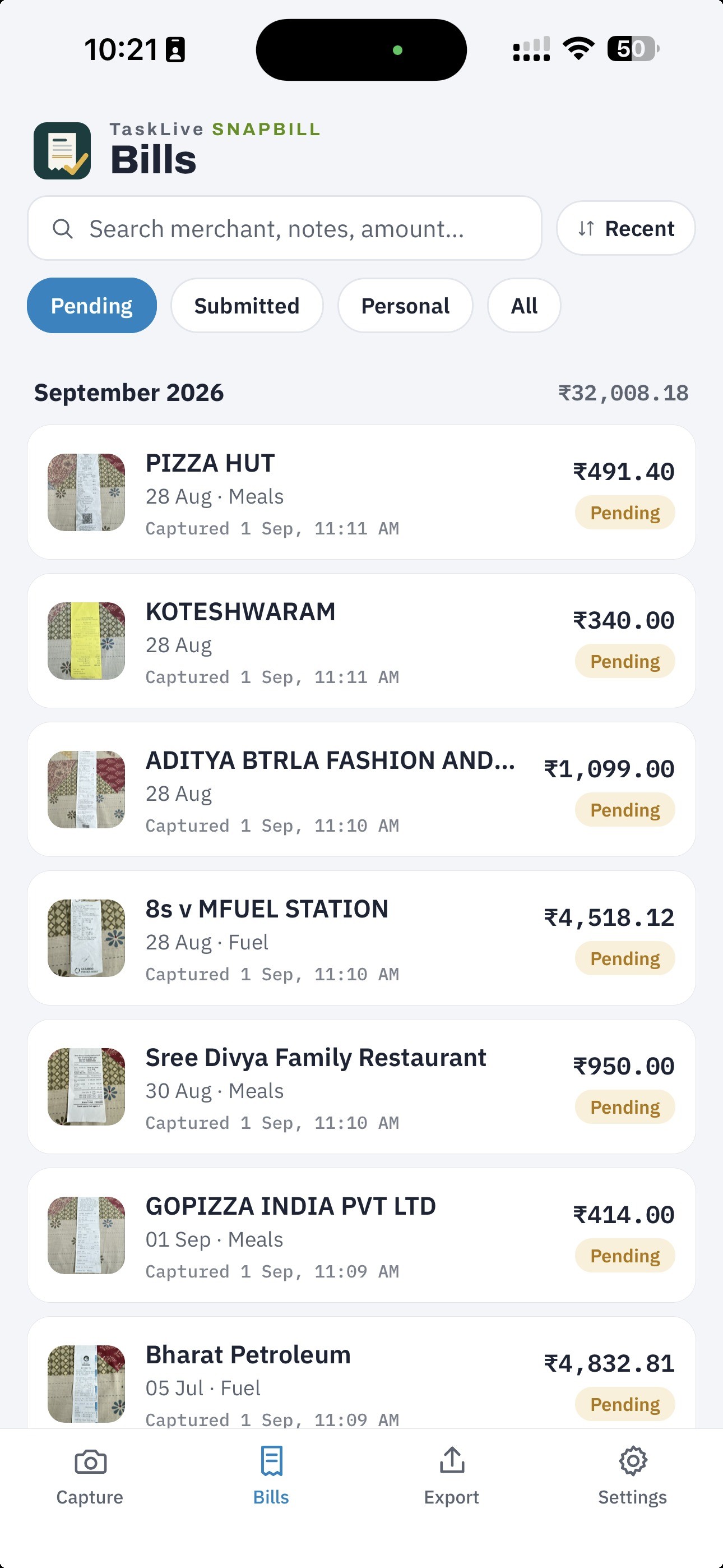
File
Bills drop into their month with a running subtotal, breakdowns by category and payment type, and a Pending or Submitted chip. Shoot the same bill twice and it tells you when you first did.
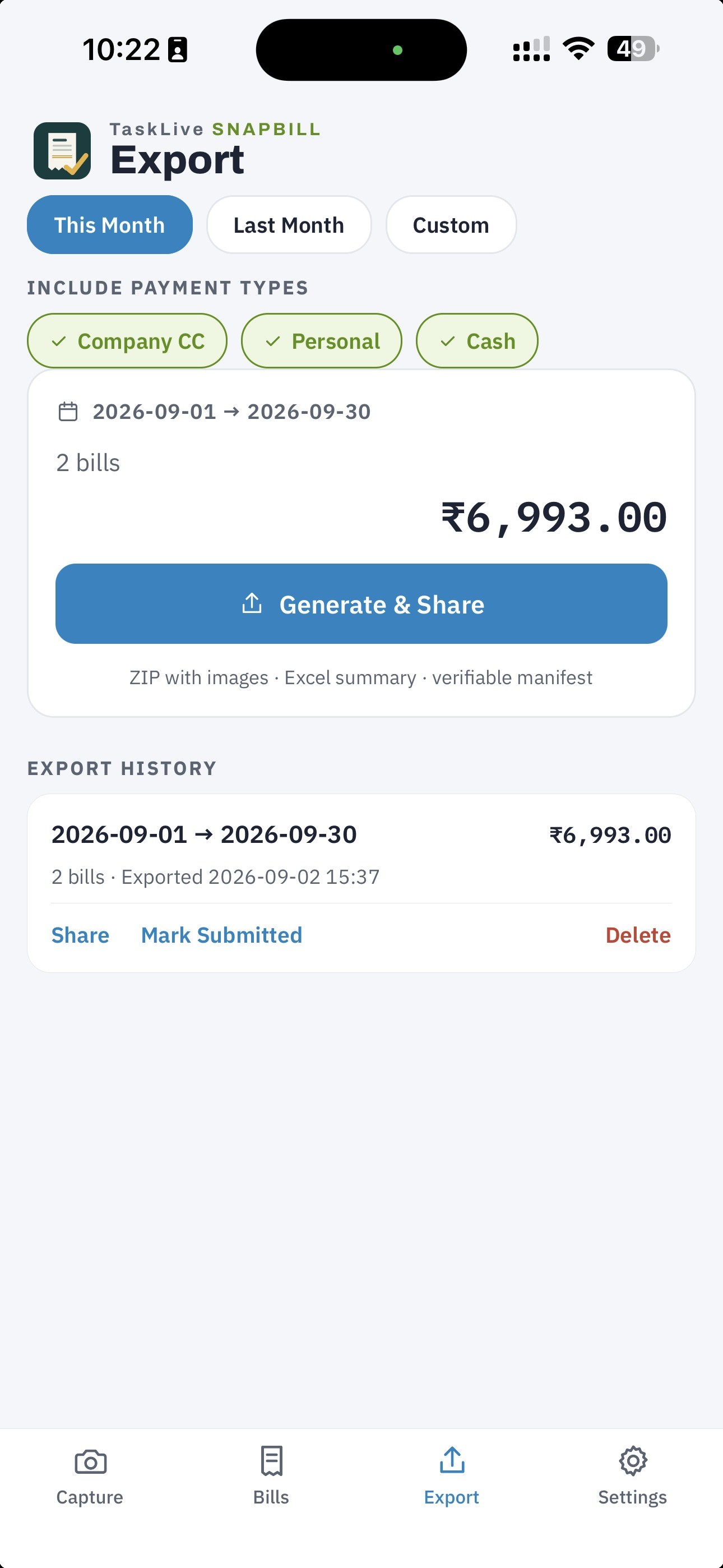
Hand over
Pick a month, get a ZIP: every bill image plus an Excel summary accounts can open straight away. Share it by email, chat or drive. Then mark the bills Submitted, as a separate, deliberate tap.
What it reads
Built for the bills people actually get handed.
Reads the bill, not just the photo
Amount paid, date, merchant and address, invoice number, GSTIN, and the CGST / SGST / IGST breakup on Indian receipts. Overseas bills get their own currency, VAT and TRN.
Long strips and multi-page folios
Supermarket strips are read section by section. Hotel folios join into one bill. Sideways photos straighten themselves.
PDF invoices too
Import the PDF that came by email or WhatsApp; it is read the same way and kept as the original file.
Learns your corrections
Correct a merchant's category once and the next bill is filed there.
Travel-ready
Currency is read off the bill. Set a home currency, enter the card rate by hand, and totals say plainly what was converted and what was not.
One file accounts can just open
Images grouped by payment type, an Excel summary with a totals sheet, and a manifest with a hash for every image so nothing can be altered unnoticed.
Privacy, by design and not by setting
There is nothing to log into, because there is nothing on the other end.
- Every photo and record sits in the app's private storage on the device. Reading happens on the phone's own hardware.
- No account, no sign-in, no server. No analytics, no tracking, no third-party SDK watching what you spend.
- Data leaves only as an export you share yourself: one file, one deliberate action, to a place you choose.
- An optional PIN on the app itself. Off by default.
For accounts teams
One ZIP per person per month. Nothing to install on your side.
Open the Excel summary in the tool you already use. Every row names its image file. Company-card spend is in one folder and personal spend stays behind. The manifest lets you verify the package end to end.
Get the app
Install it. File the first bill before the card machine finishes printing.
Nothing to set up, nothing to sign into. SnapBill runs on Android and iPhone and is on its way to Google Play and the App Store; once it is listed, updates arrive the way any app update does. Camera is the only permission the app needs. There is no account to create.
Android
Google Play · on its wayComing to Google Play. Updates will arrive through Play like any other app.
iPhone
App Store · on its wayComing to the App Store. Requires iOS 16 or later.
Want it before then?
Email us with the subject “SnapBill” and we will get you started, and tell you the day it lands in the stores.
Print and share
What is planned
On the roadmap.
Encrypted backup and restore to your own drive. Better on-device reading for faint thermal receipts. Reminders that stay on the phone. “Submit to Ganav”, a user-initiated push of the export package into a company's Ganav inbox. Public listings on Google Play and the App Store. Not planned: a server that holds your bills, or user accounts.
Questions
Common questions about SnapBill.
Do I need an account to use SnapBill?
No. There is no account, no sign-in and no server. Camera is the only permission the app needs.
Where are my bills stored?
In the app's private storage on your phone. Reading happens on the phone's own hardware, and data leaves only as an export you share yourself.
What does the accounts team receive?
One ZIP per month: every bill image, an Excel summary with a totals sheet, and a manifest with a hash for every image. Nothing to install on their side.
When will SnapBill be in the app stores?
It is on its way to Google Play and the App Store. Email info@blssoft.in with the subject “SnapBill” to get started before then, and we will tell you the day it lands.
TaskLive SnapBill
Your bills never leave your phone.
A TaskLive product from BLS Software Pvt Ltd.